Campaign agents
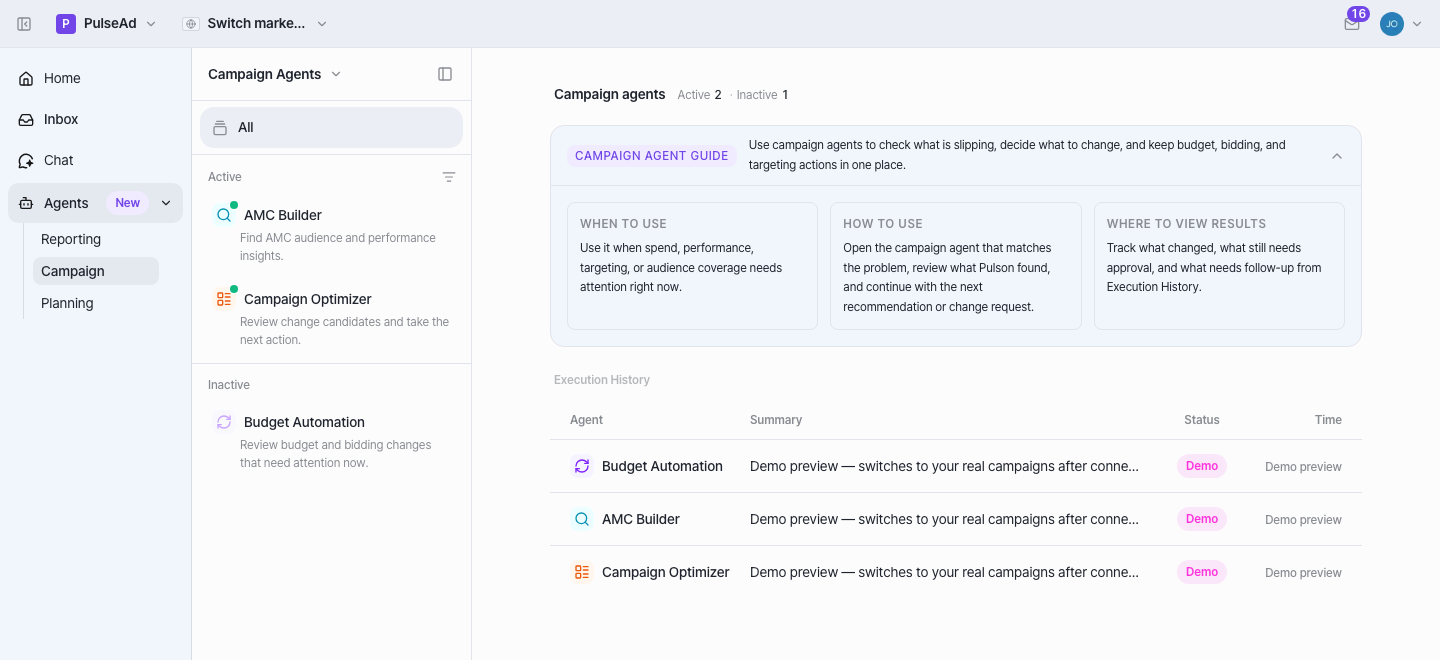
Campaign is where Pulson acts. The product describes it as: “check what is
slipping, decide what to change, and keep budget, bidding, and targeting actions in
one place.” Read Capabilities alongside this — every
real change is gated, and live budget writes reach Amazon for one pilot brand
(KISS) today.
The agents
Section titled “The agents”AMC Builder — read-only
Section titled “AMC Builder — read-only”- What it does: Compose Amazon Marketing Cloud analyses in natural language or SQL, auto-execute them against your AMC instance, track status (succeeded/failed/pending), and review the result tables and charts. Builds an audience/performance picture you can’t get from standard reports.
- Actions: None. It runs queries and returns results — it changes nothing.
- Powered by: AMC agents in
pulsead-agents— a router that sends a request to an advisor (answers AMC questions) or a writer (generates and saves AMC SQL; SELECT/WITH only). Inai-api, AMC query build/execute are chat tools; the REST routes are read-only. - Default: active.
Campaign Optimizer — propose, then chat-approve
Section titled “Campaign Optimizer — propose, then chat-approve”- What it does: A unified place to list campaigns and request bid/budget changes or campaign creation via sidebar chat. It tracks every adjustment request with before/after metrics, status, and the affected scope.
- Actions: Propose-change, human-gated. You ask for a change in natural language; it applies to live campaigns through Amazon Ads only after you approve each directive in chat. It is not autonomous.
- Powered by: Action Chat’s Action sub-agent and its
ads_*mutation tools (ads_adjust_budget,ads_pause_campaign(s),ads_update_campaigns,ads_adjust_bids,ads_update_keywords,ads_update/create_targets,ads_create_campaign, …), each wrapped in the approval flow. History comes from the campaign-execution read routes. - Default: active.
Keyword Optimizer — propose, then chat-approve
Section titled “Keyword Optimizer — propose, then chat-approve”- What it does: Discovers new keywords from Search Query/Search Term performance and proposes actions for active keywords — harvest profitable exact-match terms, pause zero-click waste.
- Actions: Propose-change, human-gated. Same model as Campaign Optimizer — nothing reaches Amazon until you approve a proposal.
- Powered by: the back-office Proactive Keyword proposers in
pulsead-agents— keyword_harvester and waste_keyword_pauser. - Default: active.
- New: shipped 2026-06-30 as “Keyword Discovery” under Planning; renamed to Keyword Optimizer and moved under Campaign on 2026-07-01 (PR #259). If you’re reading an older version of this page, it won’t have this agent yet.
Budget Automation — autonomous, under policy
Section titled “Budget Automation — autonomous, under policy”- What it does: Runs a bundled cycle — Monitor → Rebalance → Optimize → Execute → Verify — that detects pacing/out-of-budget issues, proposes product-group budget moves and bid adjustments, executes under an auto-approval policy, routes anything failed or held to a review queue, and learns the result as the next cycle’s baseline.
- Actions: Autonomous within a policy gate. This is the only campaign agent that can change live budgets/bids without per-change chat approval — the auto-approval policy decides what auto-executes vs. what’s held for review.
- Powered by: the Optimize Cycle pipeline in
pulsead-agents— six agents (input_checker → monitor → rebalancer → optimizer → executor → verifier) with two human approval gates (after rebalance, after allocation) when auto-approval is off. A 1-minute scheduler runs due cycles. - Default: inactive — it turns on only after a cycle has run for the brand, or you toggle it on.
What they do not do
Section titled “What they do not do”- They never change your account silently. Campaign Optimizer requires a chat approval per directive; Budget Automation acts only within an explicit auto-approval policy and sends the rest to review.
- Autonomous budget writes are not broadly live. The Optimize Cycle executor
sends real budget changes to Amazon only for
KISS; for every other brand it computes and records the decision but sends nothing (no-op “success”). See Capabilities. - AMC Builder doesn’t act — it’s read-only insight.
- They don’t bypass roles or guardrails. Viewer-role users can’t approve
campaign changes; budget changes pass size guardrails (≤50% / ≤$10k / ≥$1) and a
per-brand
amazon_ads_mode(disabled / dry-run / live).
How a change works, end to end (Campaign Optimizer)
Section titled “How a change works, end to end (Campaign Optimizer)”- Open the agent for the slipping campaign, in the current scope.
- Review what Pulson found — the change candidates and the reasoning.
- Propose. The Action sub-agent writes a pending action request and shows an approval card. Nothing has changed on Amazon yet.
- Approve. A permitted user approves within the ~5-minute window; viewers are blocked, guardrails apply.
- Apply. A separate, deterministic step executes the approved change via
pulsead-agents→ Amazon, and the run lands in Execution History showing what changed, what still needs approval, and what needs follow-up.
How an autonomous cycle works (Budget Automation)
Section titled “How an autonomous cycle works (Budget Automation)”input_checker validates brand prerequisites → monitor pulls 7-day + MTD
performance → rebalancer computes product-group budgets and proposes them
(gate 1) → optimizer allocates to campaigns and proposes (gate 2) →
executor patches budgets on Amazon (only for KISS; others no-op) → verifier
re-checks and auto-corrects drift. With auto-approval off, it pauses at each gate
for a human; with it on (per brand/stage), it chains through.
Related campaign capabilities (in chat)
Section titled “Related campaign capabilities (in chat)”The same Action sub-agent also exposes, from the campaign surface:
- Performance Diagnose — finds declining SP/SB/SD campaigns, root-causes them, and recommends 1–5 actions (read-only; applying is a separate gated step).
Keyword automation (keyword_harvester / waste_keyword_pauser) used to be
back-office-only; it now has its own in-app agent — see Keyword Optimizer
above.